Last week I had work experience at a local Tv station called West TV. My job was to edit together videos for a week. I started off with Movie promos, a 30 second clip to advertise a movie that would be played later in the week on the station.
After a couple of days of that, one of the higher level editors gave me the job of editing a segment for a popular current affair show that would be aired at the end of the week.
Tuesday, October 27, 2015

27/08/2015
Wow, so I really need to get more into updating this blog
So much has happened!
Our Australian survival game is coming along nicely, I'v made some progress on modeling a Kangaroo, we have an inventory system, the UI is hooked up + working with the time of day system and new rocks have been added (enviromental stuff hasn't been our priority because we wanted to get gameplay elements working first)


So much has happened!
Our Australian survival game is coming along nicely, I'v made some progress on modeling a Kangaroo, we have an inventory system, the UI is hooked up + working with the time of day system and new rocks have been added (enviromental stuff hasn't been our priority because we wanted to get gameplay elements working first)


I'v also started working on a mech game/prototype test for the new motion base that is being made for the arcade machines. So far I have a terrain and a mech with almost complete walking animations

Wednesday, August 12, 2015
Update: 13/08/2015
So it's been a while since my last post. Things have been super busy lately, as my lecturer Andy used to tell us "sometimes LGITW (life gets in the way)"
This semester we started work toward's an Australian survival game. Working in a team of 3 the aim is the create a survival game based in the Australian desert. While most survival games take a serious note, we aim to change that with our game by including Australian humour aspects such as including drop bears, jars of Vegemite and boxing kangaroos.
On top of work towards that game in the Rapid Prototyping class I'v started work towards a side-scrolling mobile game. The idea is the player escapes from a bank vault, and must make his way through the level, jumping over obstacles and dodging police. So far pleased with my progress.
You can see how it runs so far in this video below or you can view the direct link: HERE
This semester we started work toward's an Australian survival game. Working in a team of 3 the aim is the create a survival game based in the Australian desert. While most survival games take a serious note, we aim to change that with our game by including Australian humour aspects such as including drop bears, jars of Vegemite and boxing kangaroos.
On top of work towards that game in the Rapid Prototyping class I'v started work towards a side-scrolling mobile game. The idea is the player escapes from a bank vault, and must make his way through the level, jumping over obstacles and dodging police. So far pleased with my progress.
You can see how it runs so far in this video below or you can view the direct link: HERE
Tuesday, July 21, 2015
New Terrain
The other day I decided to create another terrain inside World Machine to try out in Unity 5.1


I'm pretty pleased with the results I achieved from this. Was the first time I'v attempted a valley in World machine, the process was a lot easier than I originally thought. The way it was exported in World Machine I didn't really know how to extract a splat map that would save the textures that were currently being used on the terrain. So I re-painted the textures inside Unity using textures I found online
World Machine

Unity 5

Sunday, June 14, 2015
Semester 1 Work
So the first Semester of Tafe is over, here are some screenshots of the things I'v been working on. My fighting game "Corporate Combat" was the main project I worked towards completing for the Supanova deadline and I'm pretty happy with how it turned out
This was the cow model unwrapped with a normal map applied to get the detail from the high poly mesh made in ZBrush


This was the cow model unwrapped with a normal map applied to get the detail from the high poly mesh made in ZBrush


Here are some concept art for environment for the cow game and the top down shooter.


Some of the models used in the top down game


The top down shooter game in engine


Here are some models made towards the Corporate Combat game for the arcade machines


Saturday, April 11, 2015
"Corporate Combat" A fighting game in the works.
Recently my lecturer had told our class that the arcade machines made by Tafe will be on display at this year's Supanova (Pop culture convention) And that he wanted some games to be put onto them. Last year our group got one game onto the machines and the response from people playing it was great. So this year I decided I would create a game for the machines for the opportunity for a lot of people to play my game.
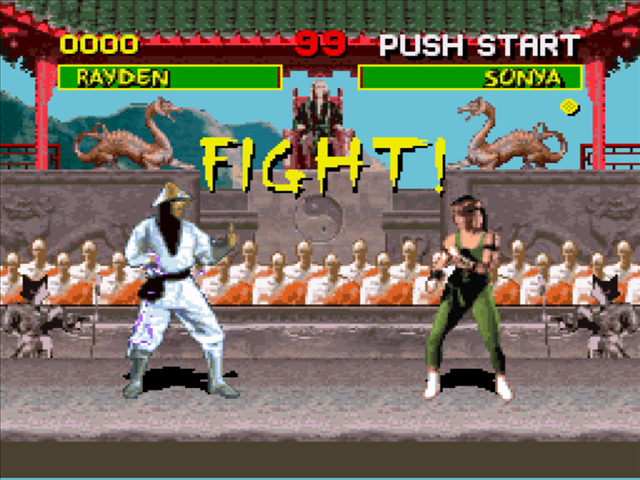
The idea I had was simple. A 'Mortal Kombat' style fighting game set in a office with a manager vs employee style scenario. I would have basic move sets which were: Punch, Kick and Block. And the player would be able to move left to right along the scene.
Reference Image:

My initial plan was to use the kinect sensor from the xbox 360 to record motion capture data of people performing these moves, but I decided against it after messing around with the software for a bit. There was too large of a chance the data would have weird movements added in. Although it wasn't the first option I wanted to do, I ended up purchasing some really nice fighting animations off the Unity Asset Store. So basically Now my animations were there, I just had to set it up inside a scene to work with controls.

At the start I began using code to control the players. I then decided to go for using PlayMaker as it was easier to set up the collisions that way between the two players so it could detect who hit who and whether to react or not. I had some great help from Fred during this process. Sometimes handling collisions can be confusing!

Next step was to start creating some assets for the office environment:


After those were modeled I then created a scene inside unity, adding some lights (WIP) and started to organise the layout of the level

Now all I need to do is add:
Sounds and music
Player models
Textures
Loading Screen
Start Screen
Ending Screen/scene
The idea I had was simple. A 'Mortal Kombat' style fighting game set in a office with a manager vs employee style scenario. I would have basic move sets which were: Punch, Kick and Block. And the player would be able to move left to right along the scene.
Reference Image:
My initial plan was to use the kinect sensor from the xbox 360 to record motion capture data of people performing these moves, but I decided against it after messing around with the software for a bit. There was too large of a chance the data would have weird movements added in. Although it wasn't the first option I wanted to do, I ended up purchasing some really nice fighting animations off the Unity Asset Store. So basically Now my animations were there, I just had to set it up inside a scene to work with controls.
At the start I began using code to control the players. I then decided to go for using PlayMaker as it was easier to set up the collisions that way between the two players so it could detect who hit who and whether to react or not. I had some great help from Fred during this process. Sometimes handling collisions can be confusing!
Next step was to start creating some assets for the office environment:
Sounds and music
Player models
Textures
Loading Screen
Start Screen
Ending Screen/scene
Friday, March 13, 2015
Unity Playmaker Game states
A few weeks ago our lecturer showed us a pretty neat plugin for Unity called Playmaker, it's essentially a visual node based version of scripting. Need to create a object when you click on something, step on something or activate a trigger then all you need is a "Create object" action. Very similar to Unreal engine's blueprint system.
Our task was to create a game using only Playmaker game states and no scripting was allowed. Challenge accepted.
My game idea was based around another game called Besiege, where the idea is to create a object to do certain tasks in a sandbox style environment (unlimited objects)
So my game works in a way where it will raycast the mouse position and place a building object, which in this case is a cube. The idea being a simple building game. Currently I havn't thought up a "end game" or goal to achieve but personally I'm pretty pleased with myself with how it turned out so far. I got the basic gameplay to work! Awesome.
Here are screens of the gamestates I used. there might be some actions included that aren't currently being called upon but I left them in there for now during the creation process to see how I'v progressed and just in case the latest thing I do doesn't work.


Our task was to create a game using only Playmaker game states and no scripting was allowed. Challenge accepted.
My game idea was based around another game called Besiege, where the idea is to create a object to do certain tasks in a sandbox style environment (unlimited objects)
So my game works in a way where it will raycast the mouse position and place a building object, which in this case is a cube. The idea being a simple building game. Currently I havn't thought up a "end game" or goal to achieve but personally I'm pretty pleased with myself with how it turned out so far. I got the basic gameplay to work! Awesome.
Here are screens of the gamestates I used. there might be some actions included that aren't currently being called upon but I left them in there for now during the creation process to see how I'v progressed and just in case the latest thing I do doesn't work.
Subscribe to:
Posts (Atom)